1. Wire an LOD Table
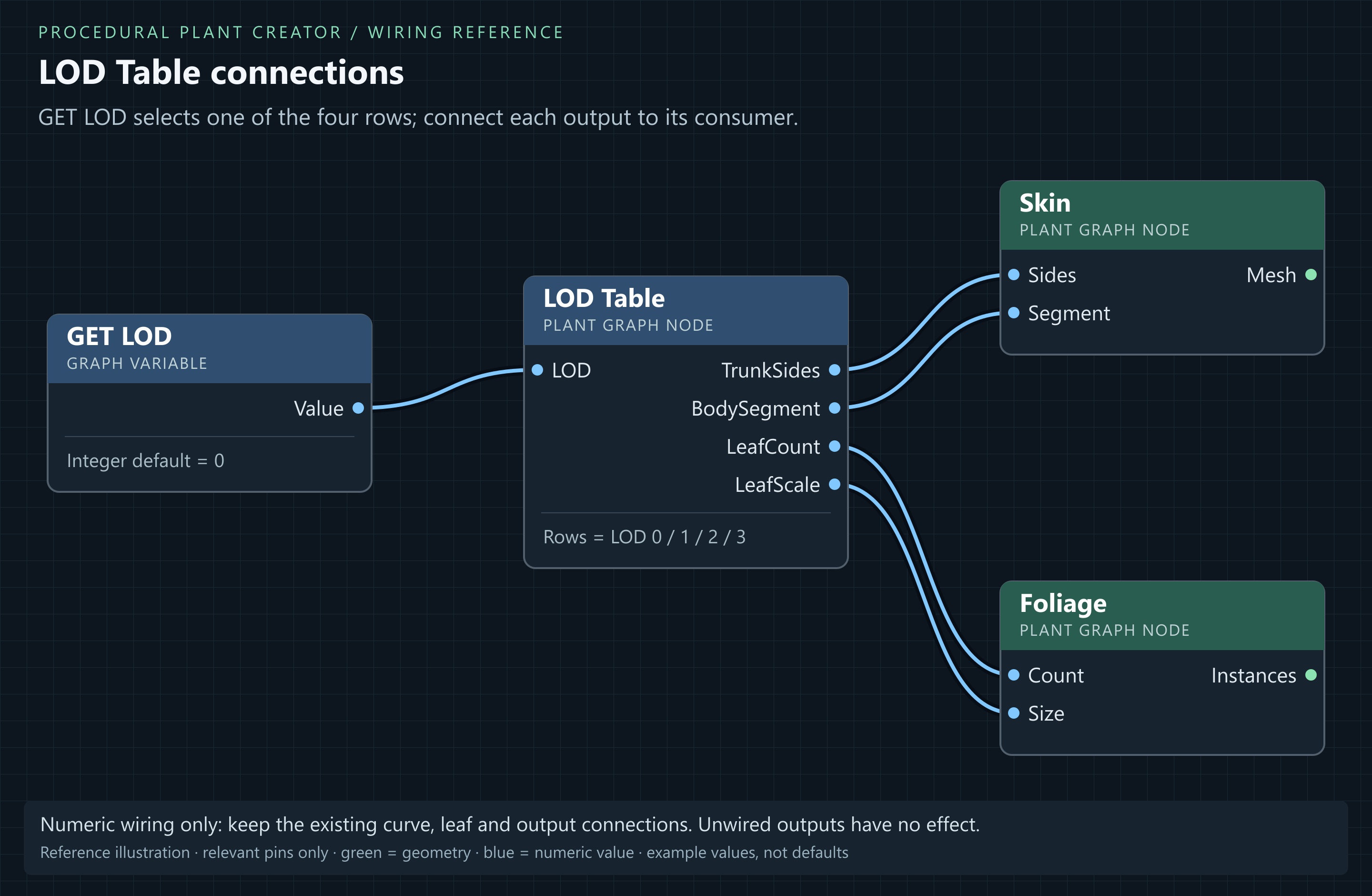
- Add LOD Table to the tree graph. Add an Integer variable named exactly LOD, default 0. Connect GET LOD.Value to LOD Table.LOD.
- Set TrunkSides to 12, 10, 8, 6; BodySegment to 0.2, 0.35, 0.55, 0.8; LeafCount to 8, 6, 4, 3; LeafScale to 1, 1.1, 1.25, 1.45. The four entries mean LOD 0, 1, 2, 3.
- Connect TrunkSides → Skin.Sides, BodySegment → Skin.Segment, LeafCount → Foliage.Count and LeafScale → Foliage.Size. Replace earlier wires on these numeric inputs.
- Use the preview LOD control to inspect all four levels. Look for angular trunks and sparse canopy. Restore LOD 0 for close-up review.
Result: Only connected table outputs affect the plant. This setup retains every branch order; Orders does nothing until connected to logic that uses it.
2. Export a Static Mesh
- Connect both wood and Foliage.Instances to Plant Output through the final join. Set graph materials and atlas settings before export.
- Click graph toolbar Export Mesh. The export realises leaf instances into mesh geometry and creates four LODs.
- The resulting SM_<GraphName> asset is created beside the graph. It can be used in standard Static Mesh placement and scattering workflows.
A Static Mesh freezes one result and has no live Seed or Height controls. Edit the source graph and export again to change it. Actor overrides do not automatically change an export made from the graph's defaults.
3. Bake an individual actor
- Select the Procedural Plant Actor with the desired individual overrides.
- In its component Cooking controls, click Bake. Use Cook Policy → Use Baked Mesh for a fixed plant.
- The bake stores wood plus separate foliage prototypes and transforms. Save these generated assets with the actor's level.
- Bake again after graph, seed, density or material changes. Test the intended map in a packaged build before shipping.
With Use Baked Mesh, registration reuses the saved bake when the level opens. Changing actor properties or using Randomize Plant still rebuilds the editable source; bake again to commit that result. In Performance, set Foliage Cull Distance and Wind Disable Distance for the map scale. Use automatic mesh LOD selection during play, and reserve forced LOD 0 for deliberate close-up checks. Individual leaf distance fields and contact shadows are disabled; wood distance fields and regular canopy shadows remain available.
| Workflow | Use | Shape control |
|---|---|---|
| Plant Graph in level | Editable procedural actor | Per-actor Seed and exposed overrides. |
| Export Mesh | Standalone mesh placement/scattering | Fixed shape; re-export to change. |
| Actor Bake + Use Baked Mesh | Saved wood and separate canopy instances | Source editable; bake again after changes. |
| Build At Runtime | Generate plant shape during gameplay | Has generation cost; profile on target hardware. |
Large modelled canopies and repeated runtime rebuilds can be expensive. Measure frame time, memory and export size in the intended scene. Nanite does not remove foliage overdraw, material cost or generation cost.