1. Expose the controls
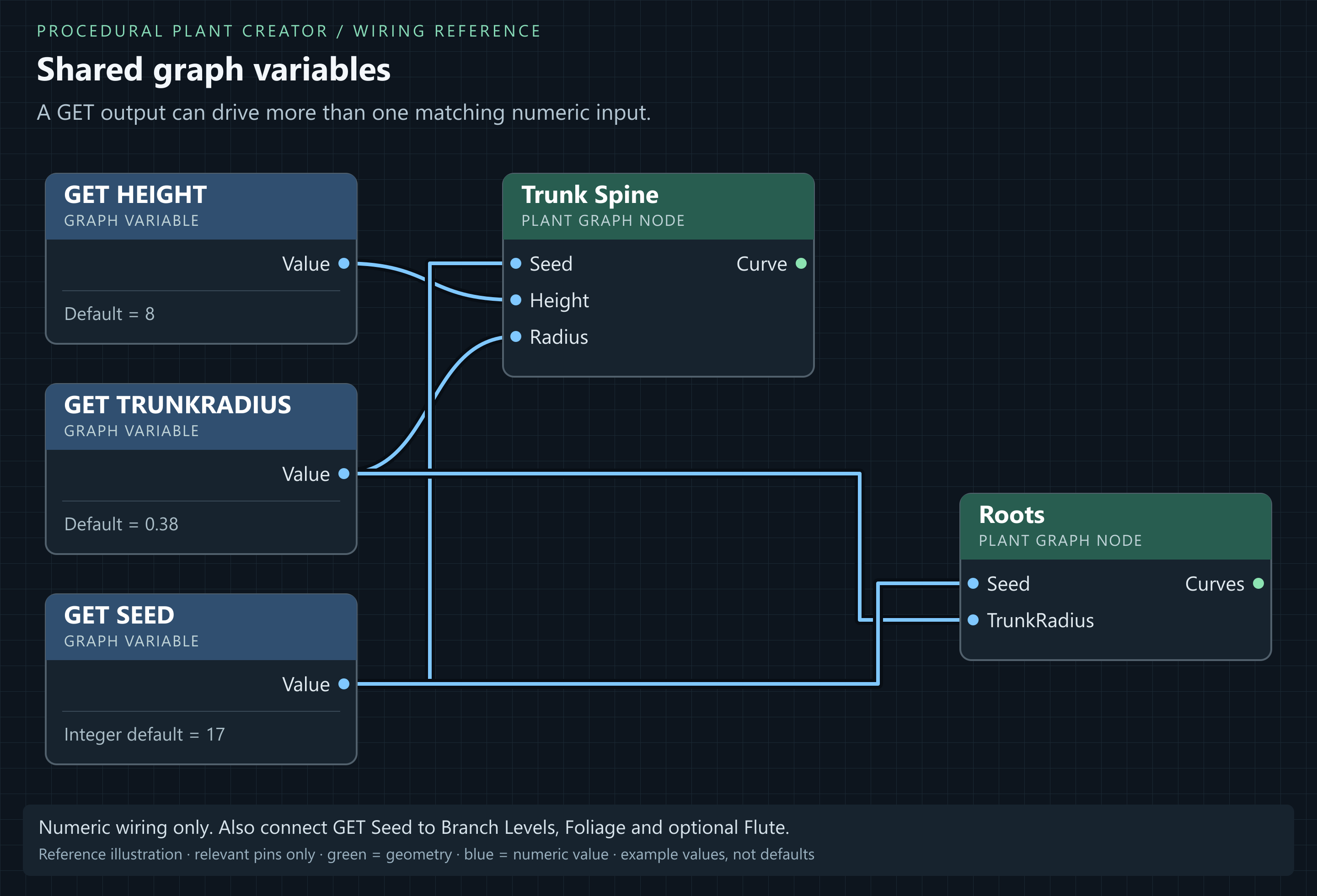
- Right-click an unconnected numeric input such as Trunk Spine.Height and choose Promote to Variable. This creates a variable and a connected GET.
- Select the variable's GET node. Node Details → Variable shows Name, Default Value, Integer, Exposed, Display Name, Category, Tooltip, UI Min, UI Max and Sort Priority. Use Height, Default Value = 8 and Exposed enabled. These settings are shared by every GET of that variable; renaming updates its GET readers. Names must be unique and non-empty. Graph Settings contains the season palette, material slots and graph-wide build settings.
- Promote Trunk Spine.Radius. Use TrunkRadius, Value = 0.38 and Exposed enabled. If renaming a variable, update its GET node's variable name too.
- Right-click canvas → Variables → Get TrunkRadius. Connect Value to Roots.TrunkRadius. Both trunk and root collar now share one setting.
- Add a variable named exactly Seed in the Variables list: Value = 17, Integer enabled, Exposed enabled. Add GET Seed nodes beside generators and connect Value to Seed on Trunk Spine, Roots, all Branch Levels, Foliage and optional Flute.
- Change Height or TrunkRadius in Variables & Settings and inspect the result. Every wired consumer should update. No SET node is required.
| Variable | Type / default | Connect Value to | Effect |
|---|---|---|---|
| Height | Float / 8 | Trunk Spine.Height | Height in metres. |
| TrunkRadius | Float / 0.38 | Trunk Spine.Radius + Roots.TrunkRadius | Consistent trunk/collar. |
| Seed | Integer / 17 | Each generator Seed | Repeatable variation. |
| RootCount (optional) | Integer / 7 | Roots.Count + Flute.Lobes | Keep root/lobe counts aligned. |
| LeafCount (optional) | Integer / 8 | Foliage.Count | Density per twig. Do not also wire an LOD count to this input. |
A variable only affects wired inputs. Naming it Seed does not replace each node's local Seed automatically. Fresh Random changes between builds; leave it out for repeatability.
2. Place editable instances
- Drag a Plant Graph into your level to create a Procedural Plant Actor. Set its Graph property to the required recipe.
- Keep Auto enabled in the Plant Graph editor and Build On Construction enabled on the actor component. Editing nodes, connections or graph defaults then rebuilds placed actors using that same graph in the editor level. With Auto disabled, click Build to apply graph changes. Actor Seed, LOD and enabled parameter or material overrides remain individual.
- Select its Procedural Plant component in Details. If exposed controls are missing, click Sync Parameters From Graph.
- Enable the override checkbox next to Height and set 7. Disabled override values do not replace graph defaults.
- For multiple instances, use the same Graph with different enabled overrides. Seed has its own component property, not a duplicate override row.
- Use Randomize Plant for a new seed. Reusing a Seed reproduces the individual when the graph contains no Fresh Random node.
| Actor | Seed | Height override | TrunkRadius override |
|---|---|---|---|
| Tree A | 17 | 7 | 0.34 |
| Tree B | 42 | 8 | 0.38 |
| Tree C | 91 | 9 | 0.42 |
Result: One shared graph, three individual plants. Editing graph defaults affects its users; editing an actor override affects that actor only.
Named references versus variables
Use Named Reroute → Create Named Reference to reuse computed geometry or values. A reference reads its declaration's output; it does not define an exposed parameter. The organizer leaves normal one-column links as visible wires and creates named routes only for fan-outs or links that jump across columns. Use graph variables and GET nodes for defaults and actor overrides.