Bend an existing limb
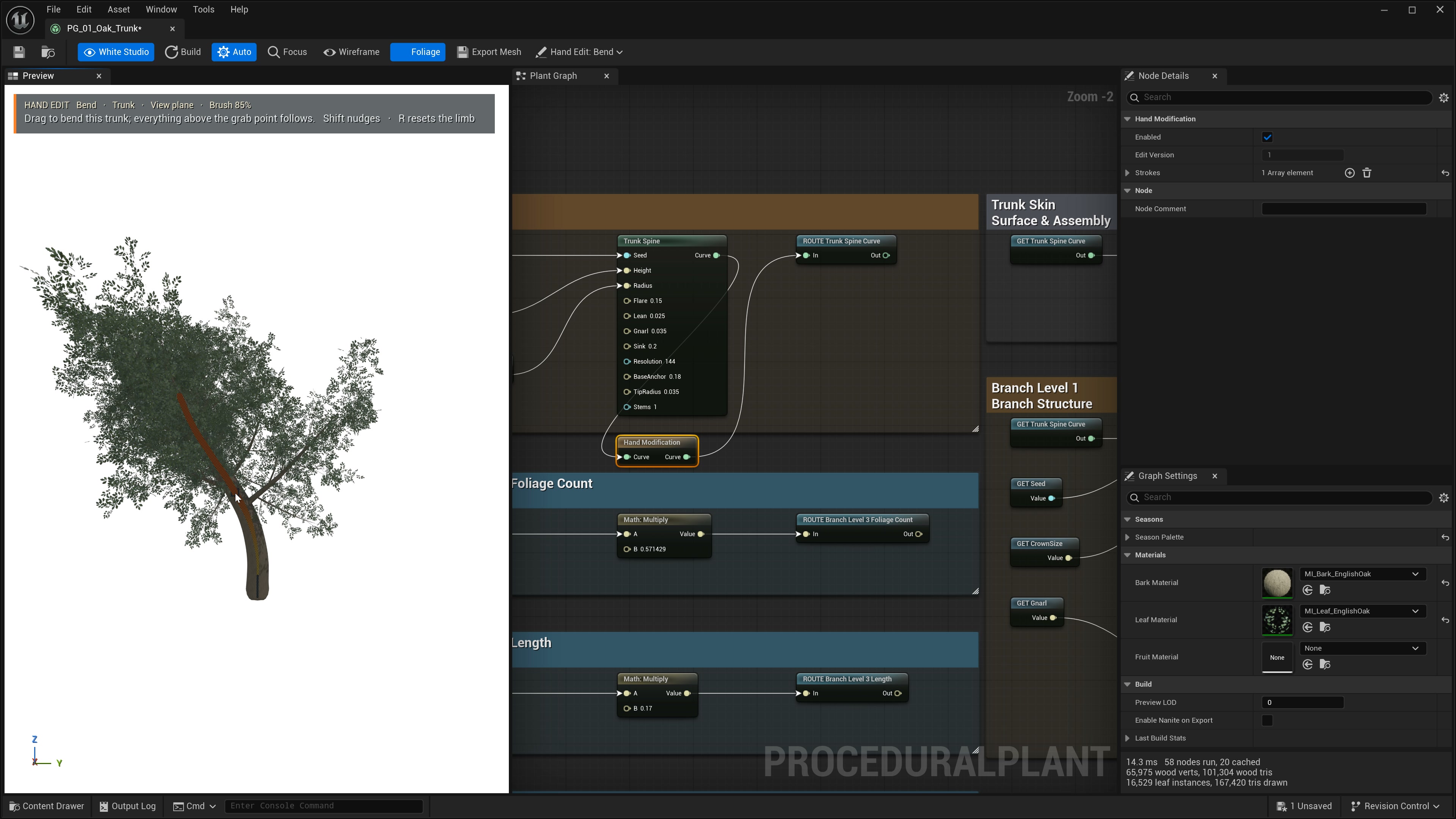
- Open a graph and choose Hand Edit > Bend (1). Under Pick target, choose Trunk only, Branches only or Roots only to reach the intended limb through a dense crown. Turn Foliage off to inspect wood.
- Hover to highlight a limb, then drag. The brush region bends and the section above the grab point follows. Hold Shift to nudge a local region instead.
- Release to keep one undoable stroke. Orbit to inspect from another direction. Escape cancels an unfinished stroke; Ctrl+Z / Ctrl+Y undo and redo; 0 returns to navigation.
| Control | Action | When to use |
|---|---|---|
| [ / ], Ctrl + mouse wheel | Resize the bend brush; the plain wheel also works during a drag. | Use a wide brush for a gradual lean and a tight brush for a local adjustment. |
| Bend brush | Tight, Medium, Wide or Whole limb. | Choose the region below the grab point that contributes to the bend. |
| Drawing plane | View aligned, XY, XZ or YZ. | Use View aligned when a locked plane is edge-on; orbit between strokes. |
| R over a limb | Reset that limb to the procedural shape. | Remove an unwanted local edit. |
Turn individual leaves
Keep Foliage visible and select Pick target > Leaves only (turn individual leaves). Cyan guides run from each leaf stem to its tip. Drag a guide towards the desired direction: that leaf or card cluster turns while its stem and size are retained. Review targets after changing the seed or foliage count.
Redraw or add a limb
Redraw from grab point (2) preserves the limb below the picked point and draws a new course above it. Draw trunk (3) starts on the view-aligned plane through the origin. Draw branch (4) and Draw root (5) start on an existing limb and add a tapered spline. Rotate the camera and use Bend to refine the shape in depth.
Editable graph history
The first committed edit inserts Hand Modification immediately after the selected curve or foliage output. Every original consumer connects to its output, including branch generators and mesh nodes. Further strokes on that modifier stay in its Strokes array. Edit stored points in Details, disable Enabled to compare the procedural shape, or delete the node to reconnect its original input to its consumers. Undo and redo cover the edit and wiring together. Changing the target or plane, starting right-mouse navigation, or losing viewport focus cancels an unfinished stroke.
The viewport overlay shows source geometry before downstream Transform or placement nodes. Shape it before applying placement transforms. Strokes store shapes in source-local metres. Bend retains segment lengths; Redraw can add samples along the new course. Stored offsets preserve the procedural source beneath the edit. Upstream parameters still regenerate beneath hand-shaped offsets. Changing branch counts or seeds can change which spline occupies a stored index; review hand edits after structural recipe changes.