1. Trunk and wood mesh
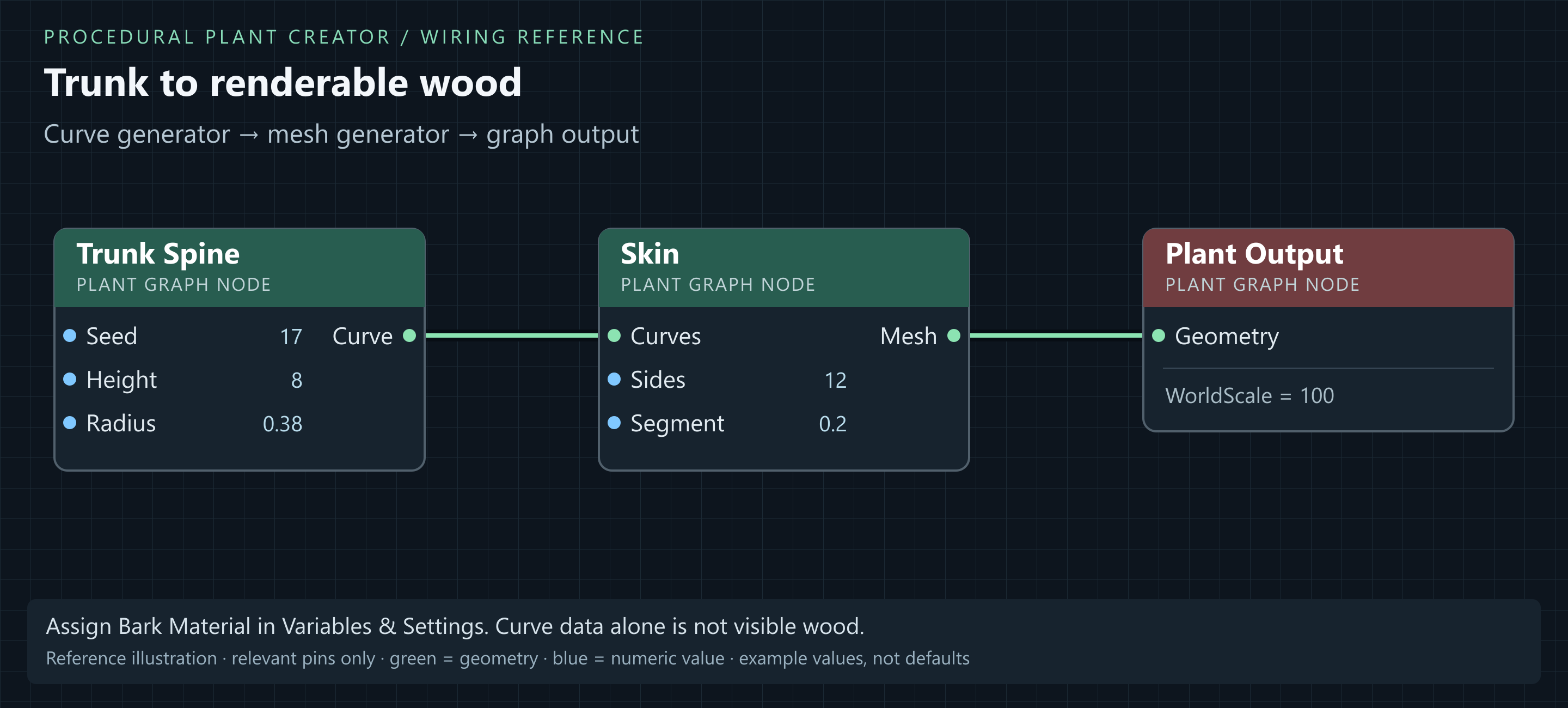
- In an Empty Graph, add Trunk Spine, Skin and Plant Output.
- Select Trunk Spine. Set Seed = 17, Height = 8, Radius = 0.38, Flare = 0.25, Lean = 0.04, Gnarl = 0.025, Sink = 0.2 and TipRadius = 0.08. Keep Resolution = 48, BaseAnchor = 0.18 and Stems = 1.
- Set Skin Sides = 12, Segment = 0.2 and MaterialSlot = 0. Keep Plant Output.WorldScale = 100.
- Connect Trunk Spine.Curve → Skin.Curves, then Skin.Mesh → Plant Output.Geometry. Click Build if Auto is off, then Focus.
- Set Variables & Settings → Bark Material to the plugin's M_TreeBark or your compatible bark material.
Result: One tapered trunk is visible. Height 8 at WorldScale 100 means about 800 cm above the base. A curve alone is not a solid mesh.
Height sets trunk length, Radius sets nominal thickness, and Flare widens the base. Lean and Gnarl modify the spine.
2. Branch hierarchy
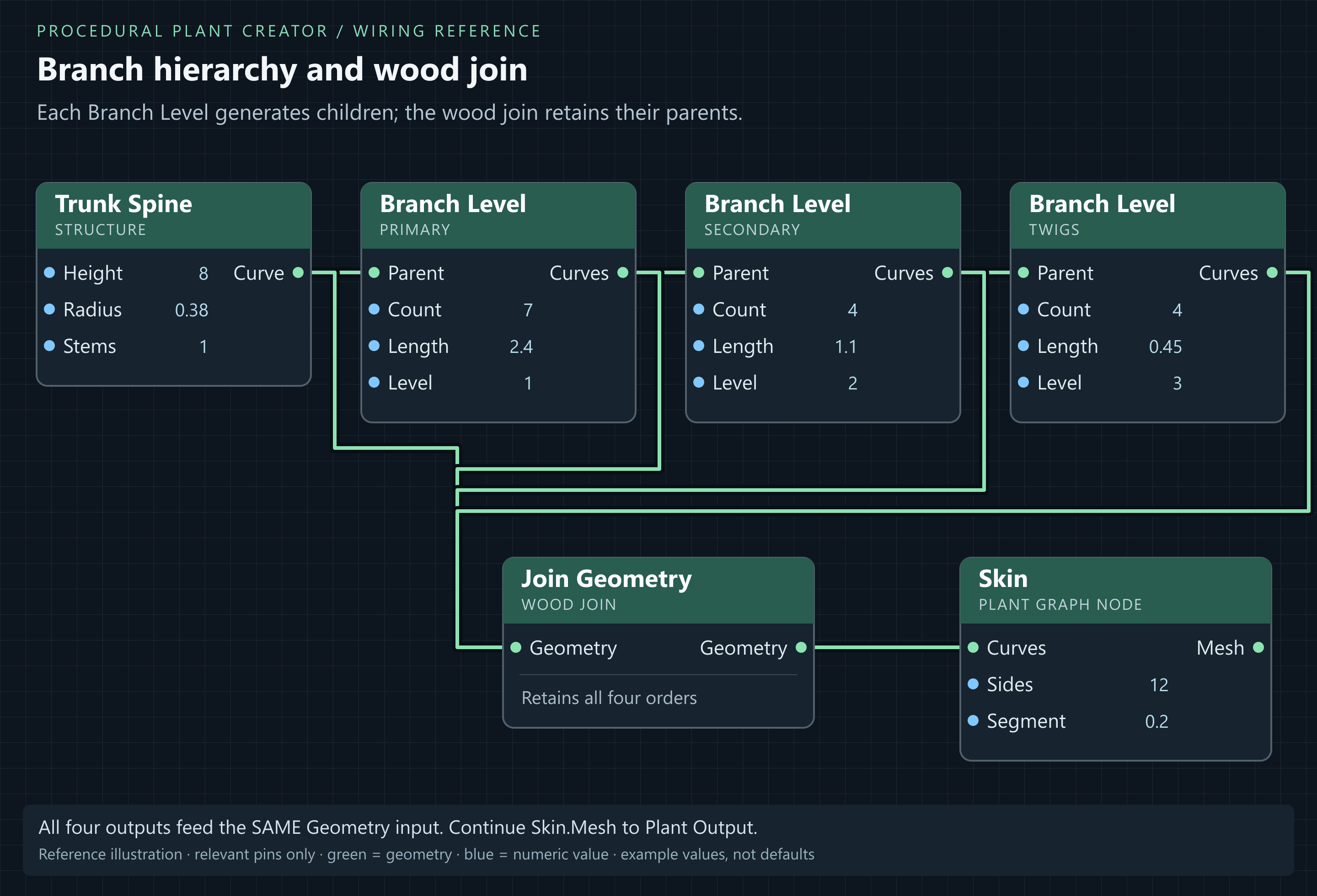
Use three Branch Level nodes for primary limbs, secondary branches and twigs:
| Setting | Primary | Secondary | Twigs |
|---|---|---|---|
| Seed | 17 | 17 | 17 |
| Count | 7 | 4 | 4 |
| TrimStart / TrimEnd | 0.4 / 0.95 | 0.25 / 0.95 | 0.3 / 0.95 |
| Length (m) | 2.4 | 1.1 | 0.45 |
| LenRand | 0.25 | 0.3 | 0.3 |
| Angle (radians) | 0.85 | 0.75 | 0.65 |
| AngleRand | 0.2 | 0.25 | 0.25 |
| RadFac | 0.55 | 0.5 | 0.4 |
| Arc | 0.2 | 0.2 | 0.15 |
| Droop | 0.05 | 0.08 | 0.1 |
| Res | 12 | 10 | 8 |
| Level | 1 | 2 | 3 |
| Whorls / Leaders | 0 / 0 | 0 / 0 | 0 / 0 |
- Connect Trunk Spine.Curve → Primary.Parent, Primary.Curves → Secondary.Parent, then Secondary.Curves → Twigs.Parent.
- Add Join Geometry before Skin. We call it the wood join; it is an ordinary Join Geometry node.
- Connect Trunk Spine.Curve, Primary.Curves, Secondary.Curves and Twigs.Curves into the same wood join.Geometry input. It accepts multiple wires; retain all four.
- Connect wood join.Geometry → Skin.Curves, replacing the direct trunk-to-Skin wire. Keep Skin.Mesh connected to Plant Output.Geometry.
Result: The trunk and three branch orders are visible. Branch Level outputs only its new children: using only Twigs would lose the larger structure.
Raise Primary.TrimStart for more clear trunk; lower it for low branches. Raise Primary.Angle for a wider crown. Tune the silhouette before adding leaf density.
3. Add roots and optional relief
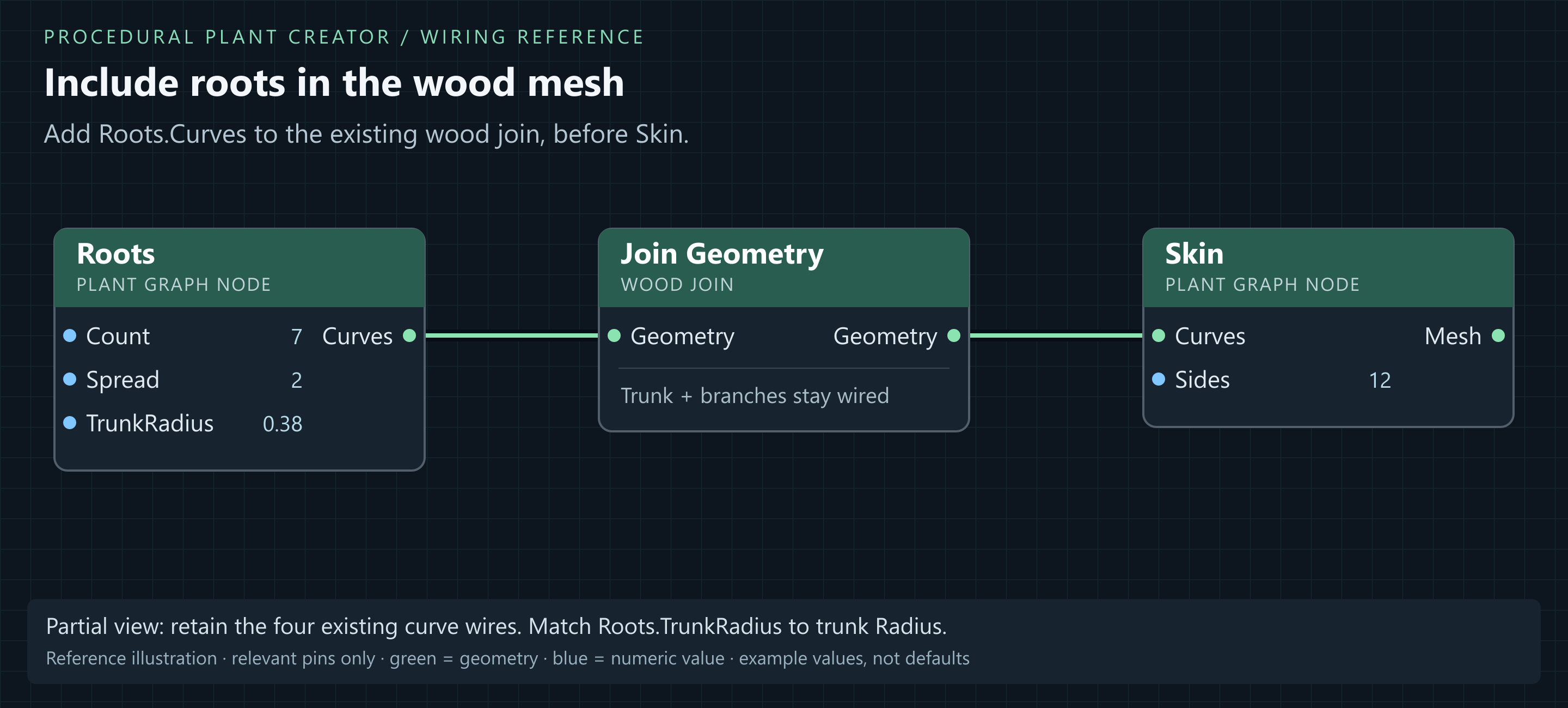
- Add Roots. Set Seed = 17, Count = 7, Spread = 2, Rise = 0.45, Thickness = 0.2, Collar = 0.7, TrunkRadius = 0.38, Sink = 0.25 and Resolution = 24.
- Connect Roots.Curves → wood join.Geometry. Five curve wires now enter that input: trunk, primary, secondary, twigs and roots. Roots has no Parent input.
- Match Roots.TrunkRadius to Trunk Spine.Radius; these settings are independent unless driven by the same variable.
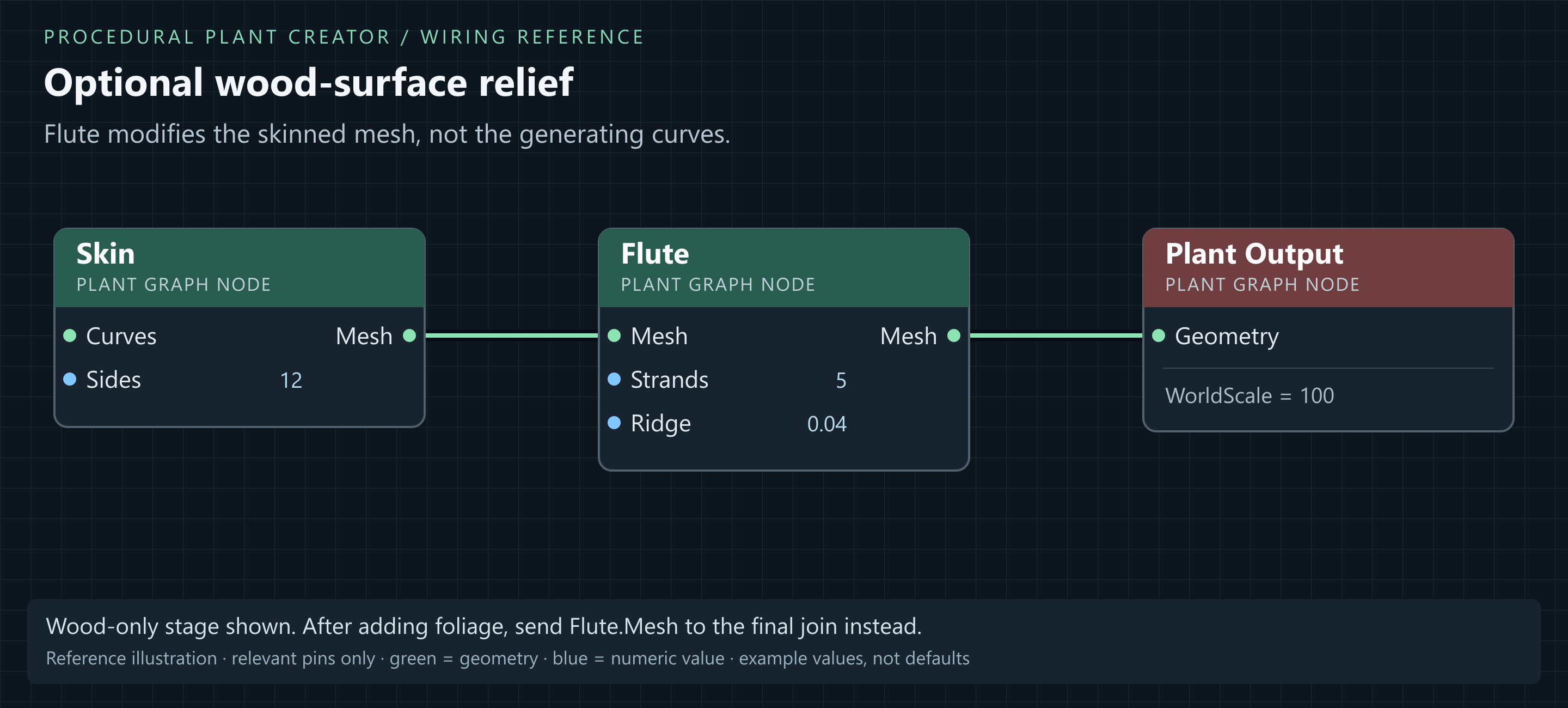
- Optional: add Flute after Skin. Replace Skin-to-Output with Skin.Mesh → Flute.Mesh → Plant Output.Geometry. Set Seed = 17, Strands = 5, Twist = 0.4, Ridge = 0.04, Sharpness = 1.6, Bark = 0.01, BarkScale = 2.2, Lobes = 7, LobeDepth = 0.06 and LobeFalloff = 3.4.
- Inspect from two sides with Wireframe. If relief is faceted, increase Skin.Sides or reduce relief. Bypass Flute for a smoother trunk.
Result: Roots and trunk share the origin. Join Geometry combines tubes; it is not a boolean union and does not guarantee a seamless welded collar.
4. Add leaves
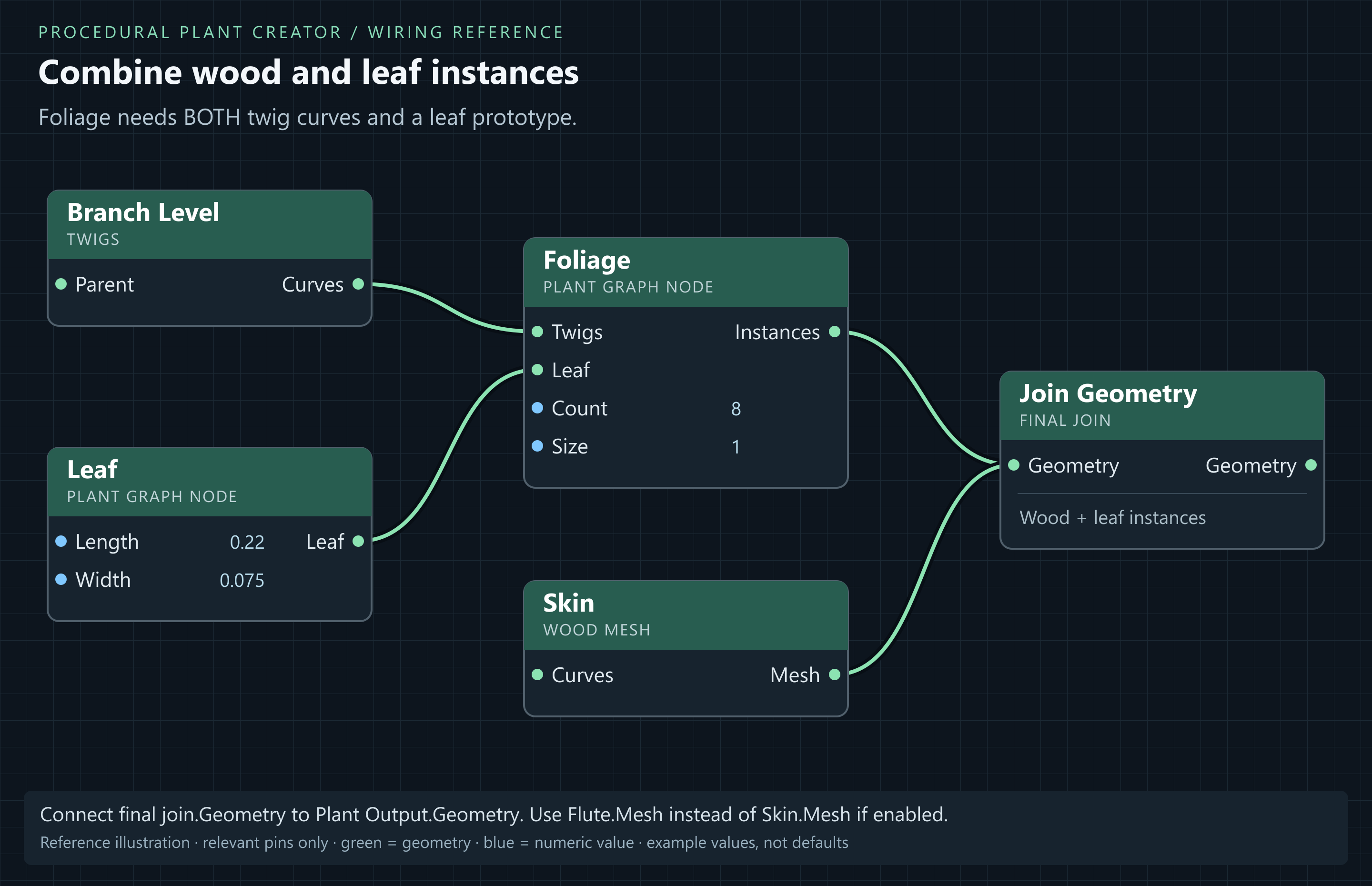
- Add Leaf, Foliage and another Join Geometry. Call this second join the final join.
- Set Leaf Length = 0.22, Width = 0.075, Fold = 0.3, Droop = 0.2, Cup = 0.09, Petiole = 0.025, ResU = 3, ResV = 11 and MaterialSlot = 1.
- Connect Twigs.Curves → Foliage.Twigs and Leaf.Leaf → Foliage.Leaf.
- Set Foliage Seed = 17, Count = 8, TrimStart = 0.15, TrimEnd = 1, Size = 1, SizeRand = 0.3, Angle = 1.05, AngleRand = 0.28, AzJitter = 0.3, Droop = 0.28, FaceUp = 0.75, RollRand = 0.4 and MinLevel = -1.
- Connect the wood mesh output (Skin.Mesh, or Flute.Mesh if used) and Foliage.Instances to final join.Geometry. Connect final join.Geometry → Plant Output.Geometry.
- Assign M_TreeLeafBlade from the plugin content to Variables & Settings → Leaf Material. This is for the modelled Leaf prototype. An atlas material needs a Leaf Card configured for that atlas instead.
- Use the graph toolbar's Foliage toggle to inspect the branch structure independently of the canopy.
Result: Leaves follow fine twigs and wood remains visible. 7 × 4 × 4 gives up to 112 twig curves before filtering; Count 8 requests about 896 instances. Increase gradually.
For cards, replace Leaf with Leaf Card and connect its Leaf output to the same Foliage.Leaf input. Start with Cross, Foliage.FaceUp = 0.15 and stronger RollRand. Match AtlasColumns/Rows to the texture; see Leaf Card reference.
5. Wind and final connection check
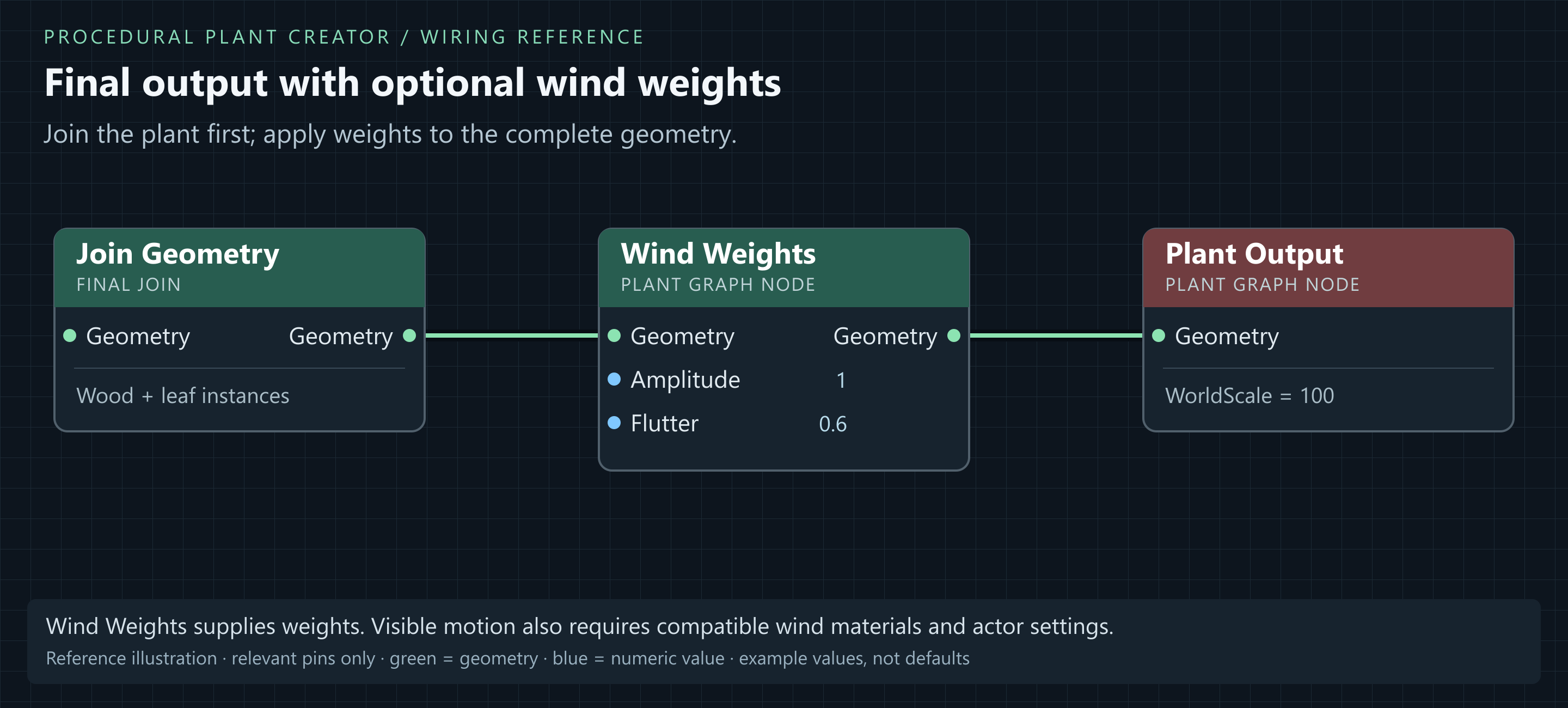
- Optional: insert Wind Weights between final join and Plant Output: final join.Geometry → Wind Weights.Geometry → Plant Output.Geometry.
- Set Amplitude = 1, Flutter = 0.6, BaseHold = 0.12 and HeightPower = 2.6. These are weights: compatible wind materials and actor wind settings are also needed for visible motion.
| Output | Input(s) | Purpose |
|---|---|---|
| Trunk.Curve | Primary.Parent + wood join.Geometry | Keep trunk and grow limbs. |
| Primary.Curves | Secondary.Parent + wood join.Geometry | Keep limbs and grow branches. |
| Secondary.Curves | Twigs.Parent + wood join.Geometry | Keep branches and grow twigs. |
| Twigs.Curves | Foliage.Twigs + wood join.Geometry | Keep twigs and place leaves. |
| Roots.Curves | wood join.Geometry | Include the root curves. |
| wood join.Geometry | Skin.Curves | Generate wood tubes. |
| Skin.Mesh (or optional Flute.Mesh) | final join.Geometry | Collect wood mesh. |
| Leaf.Leaf | Foliage.Leaf | Supply leaf prototype. |
| Foliage.Instances | final join.Geometry | Collect canopy. |
| final join.Geometry (or Wind Weights.Geometry) | Plant Output.Geometry | Complete plant result. |
Result: One connected Plant Output receives wood and foliage, with no invalid connections. Continue to variables and actor variations.