The Problem
A character wearing several garments stacked on top of each other has two kinds of waste and one visual bug:
- The body is drawn under the whole outfit but never seen.
- A lower garment is drawn under the garment above it but never seen.
- Worse — that lower garment often clips through the one above it, so shoulders, sleeves or a hem poke out where they shouldn't.
Mask each layer against what covers it to remove hidden triangles. Use paint corrections for geometry that already protrudes through the covering layer; automatic detection treats that exposed geometry as visible.
Step 1 — Put Your Layers in Order
Everything here depends on one thing: the Clothing Meshes list is the layering order, innermost first, outermost last.
| # | Mesh | Position |
|---|---|---|
| — | SK_Body | Bottom — nothing is ever worn under it |
| 1 | SK_Undershirt | Innermost garment |
| 2 | SK_Shirt | Middle layer |
| 3 | SK_Jacket | Outermost — always fully visible |
Drag the entries in the Settings panel to reorder them. If you reorder after doing work, the tool follows each garment to its new position and keeps its paint strokes — but the automatic detection results are cleared, because what covers what has just changed. Re-run detection afterwards.
Step 2 — Mask Each Layer in Turn
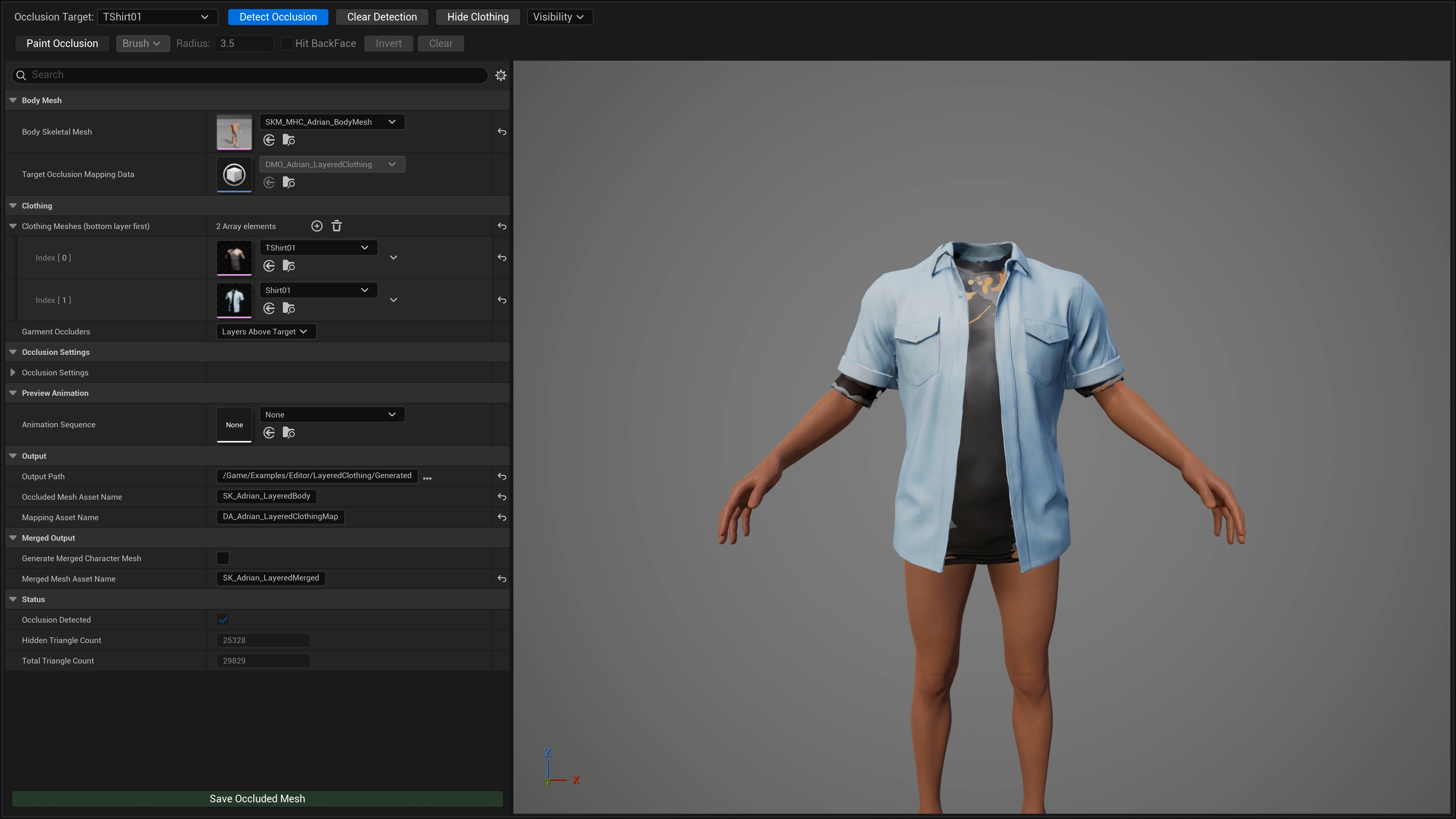
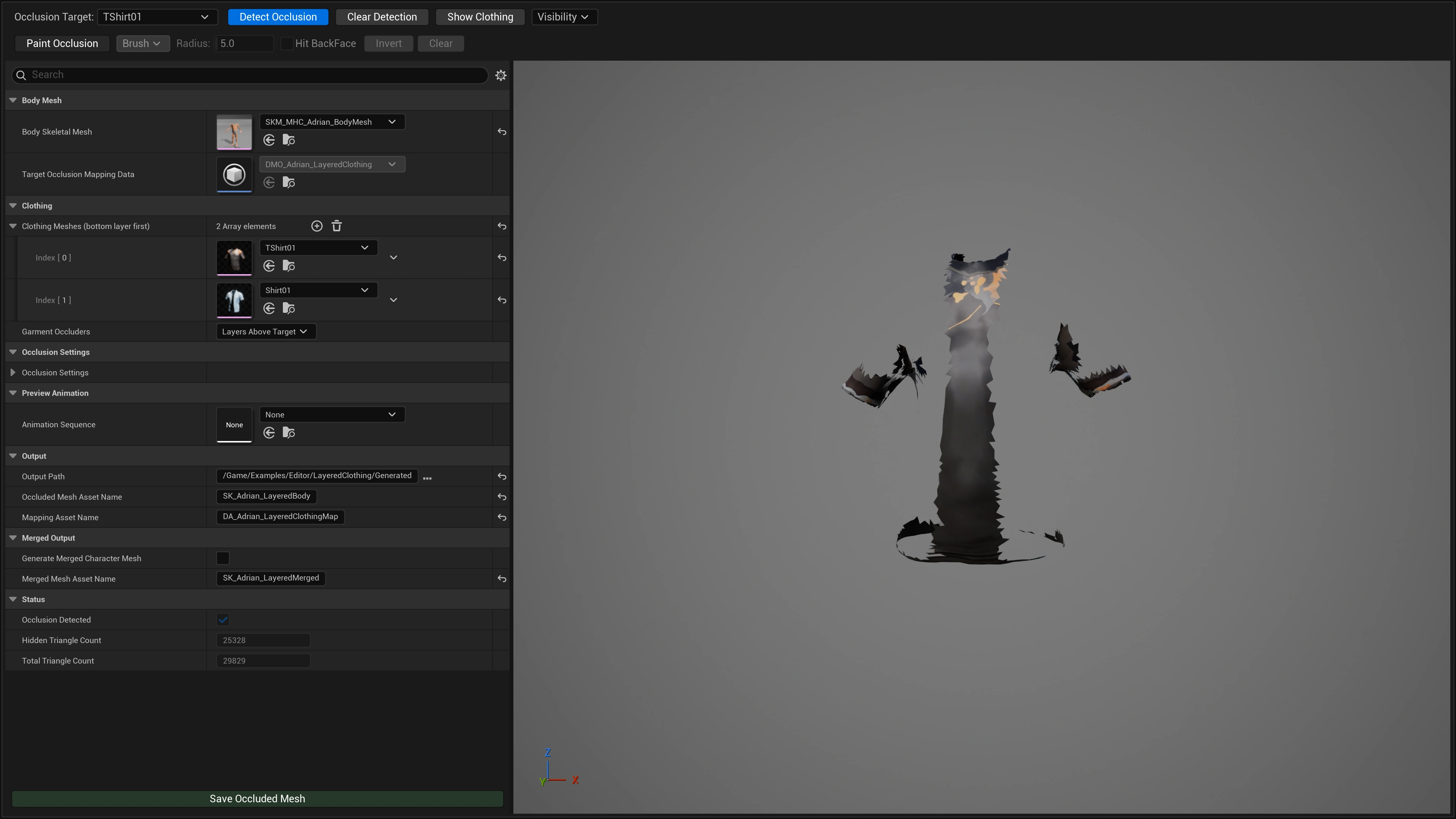
Work from the bottom up. For each target: select it, detect, paint-correct, save.
| Pass | Occlusion Target | Gets trimmed by | Produces |
|---|---|---|---|
| 1 | Body Mesh | Undershirt + Shirt + Jacket | SK_OccludedBody |
| 2 | 1. SK_Undershirt | Shirt + Jacket | SK_Undershirt_Occluded |
| 3 | 2. SK_Shirt | Jacket | SK_Shirt_Occluded |
| — | 3. SK_Jacket | Nothing — it is the top layer | No pass needed |
Each pass appends a row to the same DA_BodyOcclusionMap. You end up with one mapping table describing the whole outfit.
SK_<Garment>_Occluded, so each layer saves to its own asset instead of overwriting the previous one. Inspect the created garment asset and its mapping row after saving.
Step 3 — Fix Poke-Through by Hand
Automatic detection hides what is geometrically covered. Clipping is the opposite case — geometry that pushes outside the layer above it, so rays escape and it is correctly reported as visible. Detection will not remove it, and it shouldn't.
Remove clipping manually:
- Set Occlusion Target to the garment that is poking through.
- Click Hide Clothing / Show Clothing so the layers above it are hidden and you can see the whole garment. For finer control, open the Visibility dropdown and untick just the meshes in your way — hide the jacket alone to see how the shirt was trimmed against it, then Unhide All to compare.
- Enter Paint Occlusion and use Lasso or Select to sweep the region that sits under the upper layer — including the strip that clips out.
- Exit Paint Mode, scrub a Preview Animation through some extreme poses, and confirm no gap opens up where you cut.
- Save Occluded Mesh.
Choosing the Occluder Rule
Garment Occluders decides what counts as "above" a garment.
Layers Above Target Default
Only garments after the target in the list. The right choice for a real stack: the shirt is trimmed by the jacket, never by the undershirt underneath it.
All Other Garments
Every other clothing mesh, ignoring order. Use for pieces that don't stack — gloves, boots, a belt, a backpack — where "above" has no meaning.
What Gets Written
Each mapping entry records the mesh that was trimmed plus the meshes worn over it. Body entries and garment entries live side by side in one table.
| Entry | Target | Worn over it | Trimmed result |
|---|---|---|---|
| 1 | Body | Undershirt, Shirt, Jacket | SK_OccludedBody |
| 2 | Undershirt | Shirt, Jacket | SK_Undershirt_Occluded |
| 3 | Shirt | Jacket | SK_Shirt_Occluded |
Notes & Limits
| Topic | Detail |
|---|---|
| Top layer | Has nothing over it, so Detect Occlusion is greyed out. You can still Paint Mode it if you want to remove geometry by hand. |
| Body as an occluder | The body never occludes a garment — it sits underneath everything. |
| Merged Character Mesh | Only generated for the body target. Merging a trimmed garment with the layers above it wouldn't produce a character, so the option has no effect while a garment is selected. |
| Skeleton | Unchanged requirement — every garment must share the body's skeleton. |
| Per-target settings | Occlusion Settings are shared across targets. Tune, detect, and save one target before changing them for another. |