Choose Baked, Live or Hybrid
Call Set Body Component with the original body component before the first request. A mapping table is optional for live generation. Disable Enable Runtime Detection for baked-only swaps. Enable it together with Fallback To Runtime Detection to generate missing entries from the regular Apply Occlusion nodes.
How the mapping table matches clothing
Empty clothing slots are ignored. Mesh order does not matter for body lookups. Paths from Play In Editor are matched to the saved table. Lookup then picks:
- Exact set — the same clothing meshes that were baked.
- Containing outfit — if you pass one equipped garment, the tightest baked row that includes it (for example a shirt-only call can still apply a baked shirt + pants body).
- Largest subset — if you pass extra garments that were not baked, the largest baked combination that is fully worn.
Prefer baking each combination you actually equip. Best-match is the fallback so a wardrobe that feeds the currently equipped meshes still swaps a body instead of doing nothing.
| Node | Use |
|---|---|
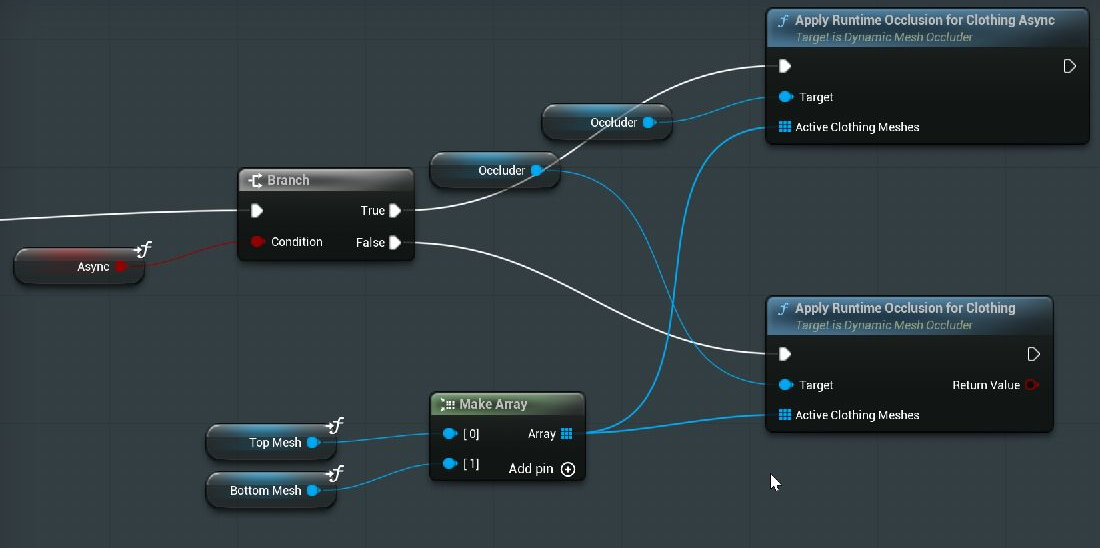
| Apply Runtime Occlusion for Clothing | Generate and apply a transient body mesh from the complete array of active clothing assets. Synchronous. Returns true only when triangles were hidden and the body was swapped. |
| Apply Runtime Occlusion for Clothing Async | Run body detection on a worker thread, then create/apply the result on the game thread. Bind On Runtime Occlusion Finished before calling. |
| Apply Runtime Occlusion for Garment | Generate a trimmed garment from its component and the mesh assets worn over it. |
| Apply Runtime Occlusion for Outfit | Generate inner garment trims and optionally the body in one synchronous call. Pass components from innermost to outermost. |
| Clear Runtime Occlusion Cache | Restore any applied cached meshes and discard cached results. Max Cached Runtime Meshes controls capacity; 0 means unlimited. |
Updating one equipment slot
- Assign or clear the changed slot's skeletal mesh first.
- Collect the meshes from all currently equipped clothing slots, such as headwear, torso, trousers, shoes, backpack, vest and mask. Exclude the body and face components. Empty slots are ignored.
- Call Apply Runtime Occlusion for Clothing once with that complete array. For posed component detection, pass the corresponding clothing components after their meshes and poses are updated.
Each request replaces the previous body occlusion. Passing only the newly equipped item does not accumulate earlier garments: a shoes-only request can replace the shirt and trousers result, and an empty request restores the entire original body.
In 1.2.2, runtime requests retain the original body when its mesh is assigned after component initialization. While an outfit is active, the component checks for external body mesh changes and reapplies that outfit after the change. This handles customization systems that assign the final body after equipping clothing. Detection runs on a body change, not every frame. Restoring the body, clearing the cache, or passing an empty outfit stops this monitoring. Call Set Body Component when selecting a different body component.
1.2.3 corrects the normal direction used when extracting Unreal skeletal geometry, joins render seams during cleanup, and adds bounded skin penetration handling. Body Blueprint nodes select skin detection; garment nodes select garment-layer detection automatically. Re-detect existing baked masks to apply these coverage fixes. These tests use mesh geometry: inspect animated poses, garment openings, and material transparency for your outfit.
Layered outfit recipe
- Before assigning a different outfit, call Restore All Original Meshes.
- Assign the new original meshes to the garment components and maintain their pose sharing.
- Make a component array such as
[Undershirt, Shirt, Jacket]. - Call Apply Runtime Occlusion for Outfit with Include Body = true, or Apply Occlusion For Outfit for baked/hybrid lookup.
- Check the returned swap count. To remove clothing, restore all original meshes before clearing the components.
The outermost layer has no overlying occluders and remains whole. Array order matters for layered outfits. Body-only clothing-set lookups ignore order and duplicate meshes.
Async completion and wardrobe controls
Bind On Runtime Occlusion Finished once during setup. Read Success, Occluded Mesh and Hidden Triangle Count; clear your UI busy state and restore the original body on failure. Use Is Runtime Occlusion In Progress for busy indicators. A newer request supersedes pending work; restoring the original body cancels a pending body request. The async node generates the body only; layered outfit generation is synchronous.
Hide clothes should call Set Visibility on the garment components while keeping their meshes and the occlusion result. Remove outfit should restore the body and garments, then clear the clothing. These are different controls.
Prepare meshes for runtime generation
- For Apply Occlusion For Clothing Components / Apply Runtime Occlusion for Clothing Components, detection skins the current posed vertices into the body component's space. Use these nodes when clothes change on a moving character.
- Enable Allow CPU Access on each source body and clothing mesh for mesh-asset nodes, packaged builds without a CPU copy, or when posed extract cannot read skin weights. If a CPU copy already exists, detection can read it without that flag.
- Set Minimum LOD to 0, enable Never Stream, and disable Stream LODs in each mesh's LOD streaming settings. The example also uses
r.MeshStreaming=0to keep mesh data available in packaged builds. - Runtime detection trims LOD0, the highest-detail mesh. The 1.2.1 hotfix keeps only this trimmed LOD in generated runtime meshes, preventing an untouched lower LOD from revealing the body at distance. The original asset keeps all its LODs and is restored when clothing is removed. This means generated meshes retain LOD0's rendering cost at distance. With earlier plugin builds, explicitly keep affected components at LOD0.
Mesh-asset nodes still detect against bind-pose reference geometry. Component nodes use the posed component transforms. If live detection hides no triangles, the original body is restored, the node returns false, and On Runtime Occlusion Finished reports Success = false. An empty clothing array restores the original body and returns true. Synchronous detection and mesh creation have a runtime cost; asynchronous detection still applies the mesh on the game thread. Profile outfit sizes on your target platform. Runtime meshes are transient; use the editor workflow for assets you need to save or export.
Adding the Component
- Add the component — Open your character Blueprint, click + Add and search for Dynamic Mesh Occluder.
- Assign the Mapping Table — In the Details panel set Mapping Table to your
DA_BodyOcclusionMapasset. - Call Blueprint nodes — When clothing is equipped or removed, call the appropriate node (see table below).
USkeletalMeshComponent.
Blueprint Nodes
Primary Actions
| Node | When to call | Description |
|---|---|---|
| Apply Occlusion For Clothing Components | Player equips clothing | Pass in active clothing mesh components, including unused empty slots. Looks up the baked body first, then runs posed runtime detection if fallback is enabled. |
| Apply Occlusion For Clothing | Player equips clothing (mesh assets) | Same lookup, but from Skeletal Mesh assets. Runtime fallback uses bind-pose asset geometry. |
| Restore Original Body Mesh | All clothing removed | Swaps the body back to the original full mesh. |
| Apply Occlusion By Mapping Index | Clothing managed by index/slot | Applies the occluded mesh at a specific index without passing clothing meshes. |
Layered Outfits
Use these when you have masked individual garments as well as the body.
| Node | When to call | Description |
|---|---|---|
| Apply Occlusion For Outfit Recommended | Whenever the outfit changes | Resolves the whole stack in one call. Pass the garment components ordered bottom layer first; each garment is swapped for its trimmed version against the layers above it, and the body against the whole outfit. Set Include Body to also swap the managed body component. Returns how many components were swapped. |
| Apply Occlusion For Garment | One garment changes | Swaps a single garment component, given the meshes worn over it. Remembers that garment's original mesh the first time it swaps. |
| Restore Original Garment Meshes | Outfit removed | Puts every garment this component swapped back to its untrimmed mesh. |
| Restore All Original Meshes | Full reset | Restores the body and every swapped garment in one call. |
| Find Occluded Mesh For Target Pure | Validation / preview | Returns the trimmed mesh that would be used for a given target mesh + the meshes worn over it, without swapping. Pass an empty target to query the body. |
Component Management
| Node | Description |
|---|---|
| Set Body Component | Explicitly assigns which skeletal mesh component to manage. |
| Get Body Component Pure | Returns the currently managed skeletal mesh component. |
| Get Original Body Mesh Pure | Returns the original un-occluded body mesh recorded at BeginPlay. |
Query & Inspection
| Node | Description |
|---|---|
| Find Occluded Mesh For Clothing Pure | Returns which occluded mesh would be used — without swapping. For previewing or validation. |
| Find Occluded Mesh For Clothing Components Pure | Same as above but accepts Skeletal Mesh Components. |
| Get Mesh Mapping Count Pure | Returns how many clothing combinations are stored in the mapping table. |
| Get Clothing Meshes At Mapping Index | Returns the clothing meshes at a given mapping index. |
| Get Occluded Mesh At Mapping Index Pure | Returns the occluded mesh at a specific index without applying it. |
| Get Target Mesh At Mapping Index Pure | Returns which mesh that entry was generated for — the body, or a specific garment. Useful for iterating a table that mixes both. |
Multiple Outfits
Store as many clothing combinations as you need in a single DA_BodyOcclusionMap. Each time you run detection with a different clothing set and save, a new entry is added.