Open the shader playground to explore all 84 post-process presets without installing the pack. Select Customize for an interactive preview, or Unreal captures for the original engine-rendered comparisons.
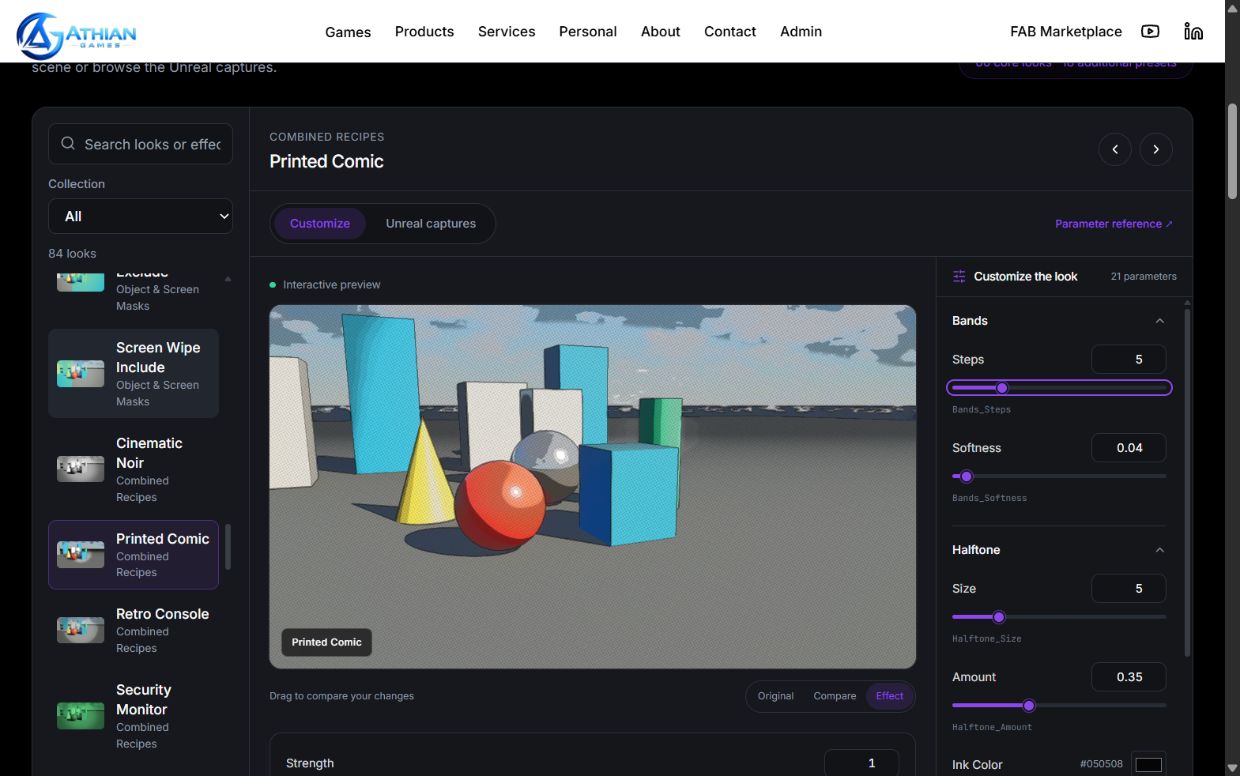
- Search for a look or choose a collection. Selecting another preset starts from that preset's demo defaults.
- Drag the sliders or enter a value. Expand the groups for additional controls. Colors include a picker and RGB fields; vector controls use XYZ fields.
- Use Strength to fade the effect. Open Blend & advanced for multiply/overlay blending, the shader's split control, and stencil options.
- Drag the preview to compare your settings with the original scene. Original, Compare, and Effect select useful viewing positions.
- For time-driven shaders, use Pause motion to inspect a frame. Motion starts paused when your device requests reduced motion. Arrow keys also adjust focused sliders.
- Reset an individual changed parameter or use Reset look. Switching between Customize and Unreal captures retains the current edits.
Copy your settings
Copy Unreal settings copies the preset asset path and exact scalar/vector parameter names and values as JSON. This is a reference for your setup, not an automatic Unreal import format. Duplicate the corresponding material instance, enable its parameter overrides, and enter the values. During play, pass the scalar/vector values to the layer's dynamic material instance using Set Scalar Parameter Value or Set Vector Parameter Value.
World and stencil controls
The browser demo uses captured scene depth, surface normals, and stencil IDs 1 and 2. World-space origins and mask centers are positioned on this exhibit. Move those coordinates to suit your own level. Stencil-related controls require the matching include/exclude or stencil mode to be enabled; radius and box dimensions apply to their corresponding shapes.
Preview scope
The live view adapts the pack's shader code to a fixed captured scene. It demonstrates parameter behavior; it is not a running Unreal project. Color, temporal sampling, depth precision, and performance can differ from your project. Scene geometry and camera are fixed, while shader animation runs in the browser. The four Niagara lenses are documented separately and are not part of this post-process playground.
The live view requires WebGL 2. If unavailable, use the Unreal captures and the complete parameter reference. The slider ranges are intended for useful exploration; the Unreal material editor may allow wider ranges. RGB fields support values above 1 for bright tint values.