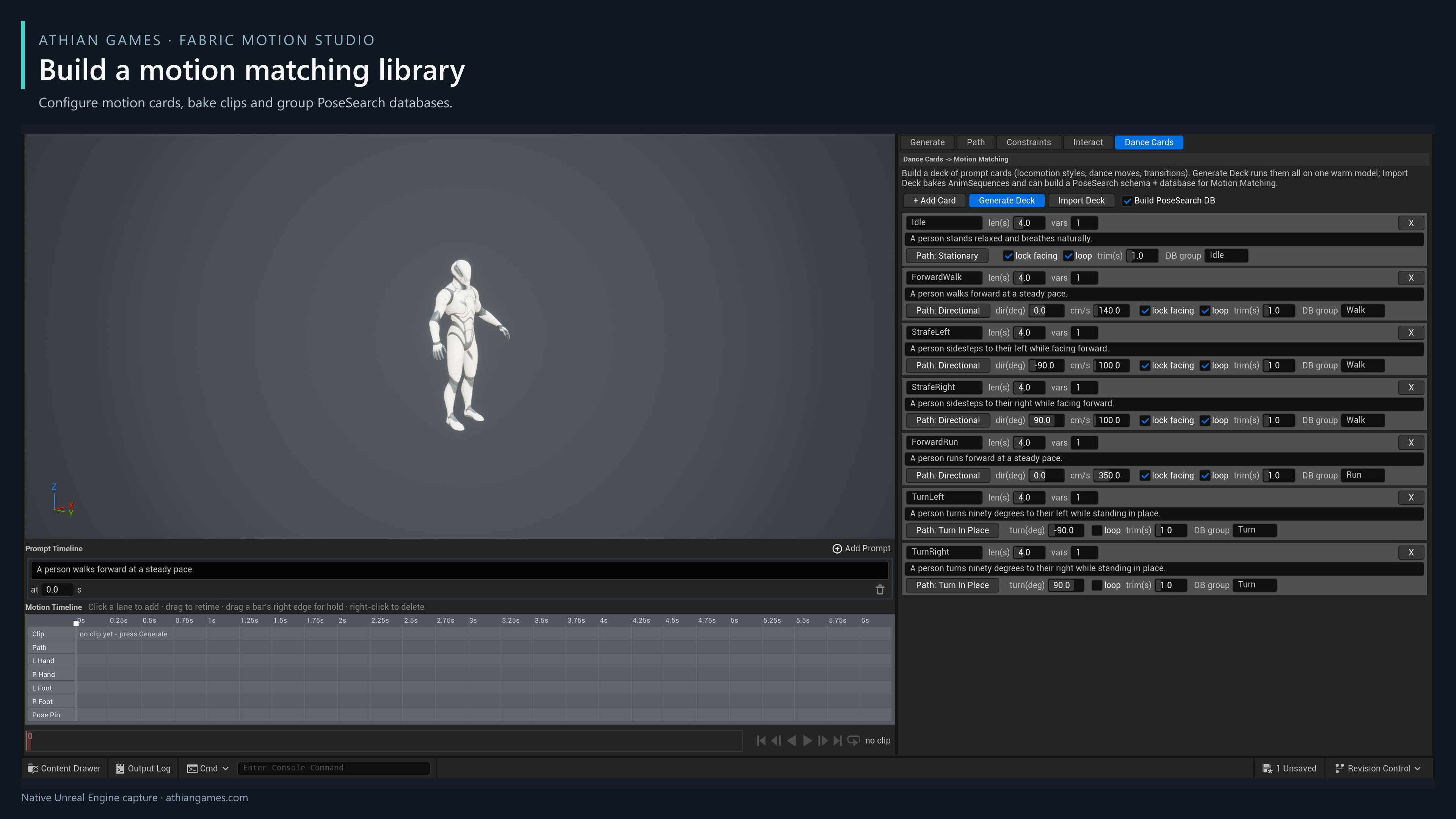
- Open FA_LocomotionCards and choose the Dance Cards tab.
- Add a card, name it, enter its prompt and duration, and set a seed and variation count.
- Choose its path type: Directional Line, Stationary, Turn In Place or Prompt Only. Set travel direction, speed and heading locking as appropriate.
- Press Generate Deck. Wait for the deck-complete message.
- Set the export folder, then press Import Deck. Open the created AnimSequences, PoseSearch schema and database. Review the clips and indexed poses before assigning the database to gameplay.
| Parameter | Example or default | Effect and use |
|---|---|---|
| Num Variations | Default 1; up to 8 | Generates separately seeded variations of a card. |
| Move Angle | Degrees | Chooses a Directional Line route; combine with Lock Heading for strafing. |
| Speed | Default 140 cm/s | Constrains the card's root travel. Match it to the requested gait. |
| Constraint Start / Trim Start | Defaults 1 / 1 seconds | Allows a settling interval, then removes the initial portion when importing. |
| Looping Clip | Default enabled | Exports an observed cycle from compatible repeated poses. Generate at least two steady strides after settling; disable for one-shot actions. |
| Database Group | Default Stand | Creates a separate PoseSearch database for each group so gameplay can select a movement state. |
Loop export checks pose, foot phase, facing and travel before selecting a cycle, then blends a short overlap around its ends while retaining root travel. Contact notifies are shifted to the selected cycle and notifies outside it are omitted. If no compatible cycle is found, import rejects that clip: generate a longer steady take, or disable Looping Clip for a one-shot. Review the resulting native animation seam before using it in gameplay.
The imported seven-clip library is under Examples/MotionStudio/MotionMatching: idle, forward walk, left/right strafes, run and left/right turns. The imported clips are organized into idle, walk, run and turn databases. The editable cards remain in Authoring. Set the export folder on Generate, then return to Dance Cards to import. Generate a fresh deck before importing it on a new computer; the author's temporary deck job directory is not a customer dependency.