Layers
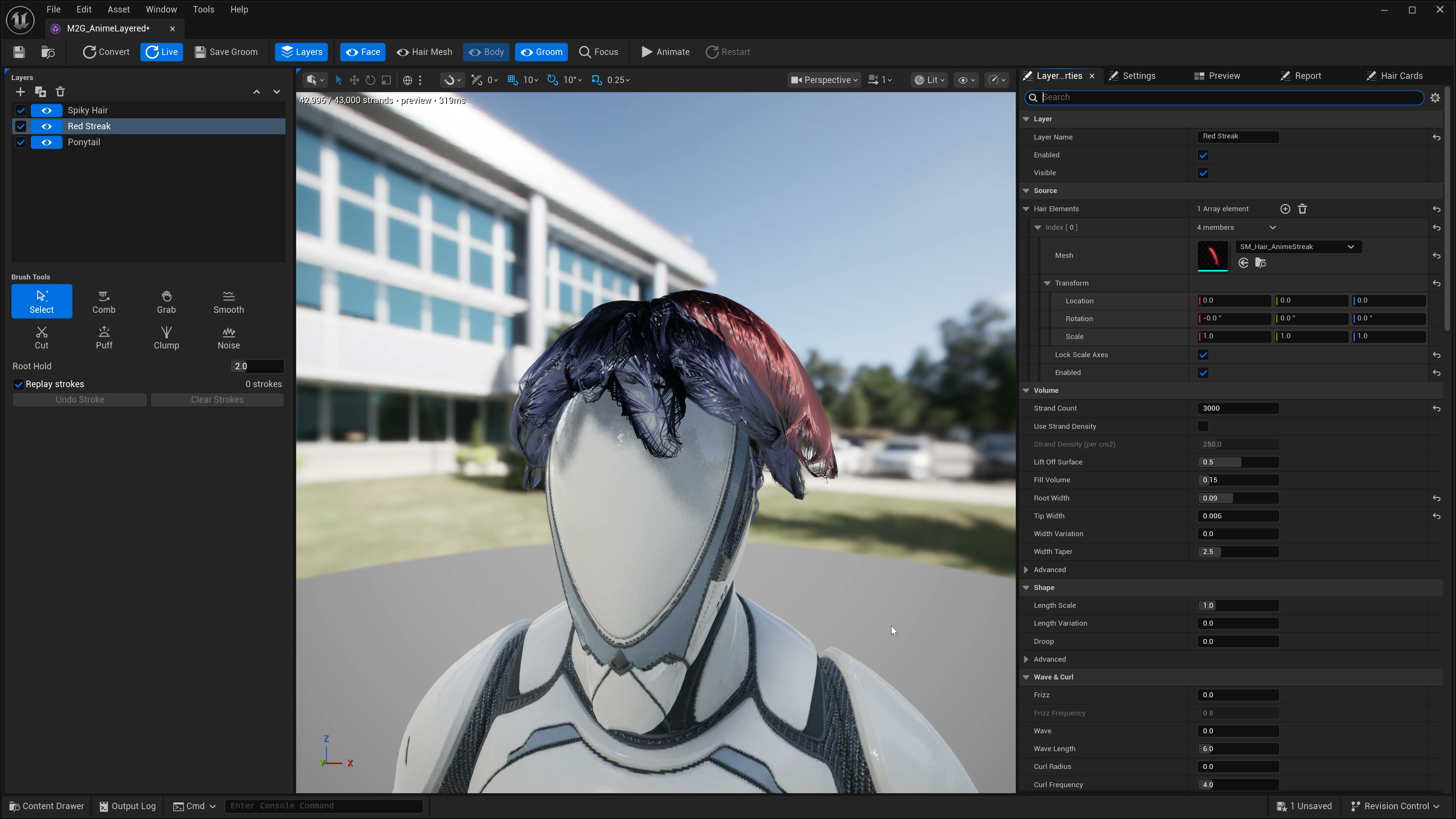
The recipe is a stack of layers. Each enabled layer owns its groups on the saved groom, with its own Hair Elements, Conversion, Style, Appearance, Physics, and grooming strokes. Split Groups By Material can create several groups for one layer; those groups retain that layer's settings.
Hair pieces still go in Hair Elements, but that array lives on the selected layer, not on the recipe root. Older recipes that stored Hair Elements on the recipe root migrate into a single layer on load.
Use the Layers panel to add, rename, enable, or hide layers. Binding, output path, hair-card LOD, preview budget, and animation preview stay on the recipe.
| Layer control | What it does |
|---|---|
| Selected layer | Chooses the source elements, parameter panel, and brush strokes being edited. Selection alone does not move the combined groom. |
| Add / Duplicate | Copies a layer's starting settings and source elements. The copy has independent settings and brush history. |
| Enabled | Off excludes the layer from conversion, the live preview, and Save Groom. |
| Visible | Off hides the layer in the live preview. Explicit Convert and Save Groom still include it while Enabled is on. |
| Move up / down | Changes layer order while retaining its source elements and settings. |
| Hair Element transform | Moves, rotates, or scales that element. In a recipe with several layers, Live Update rebuilds the groom after the edit settles. |
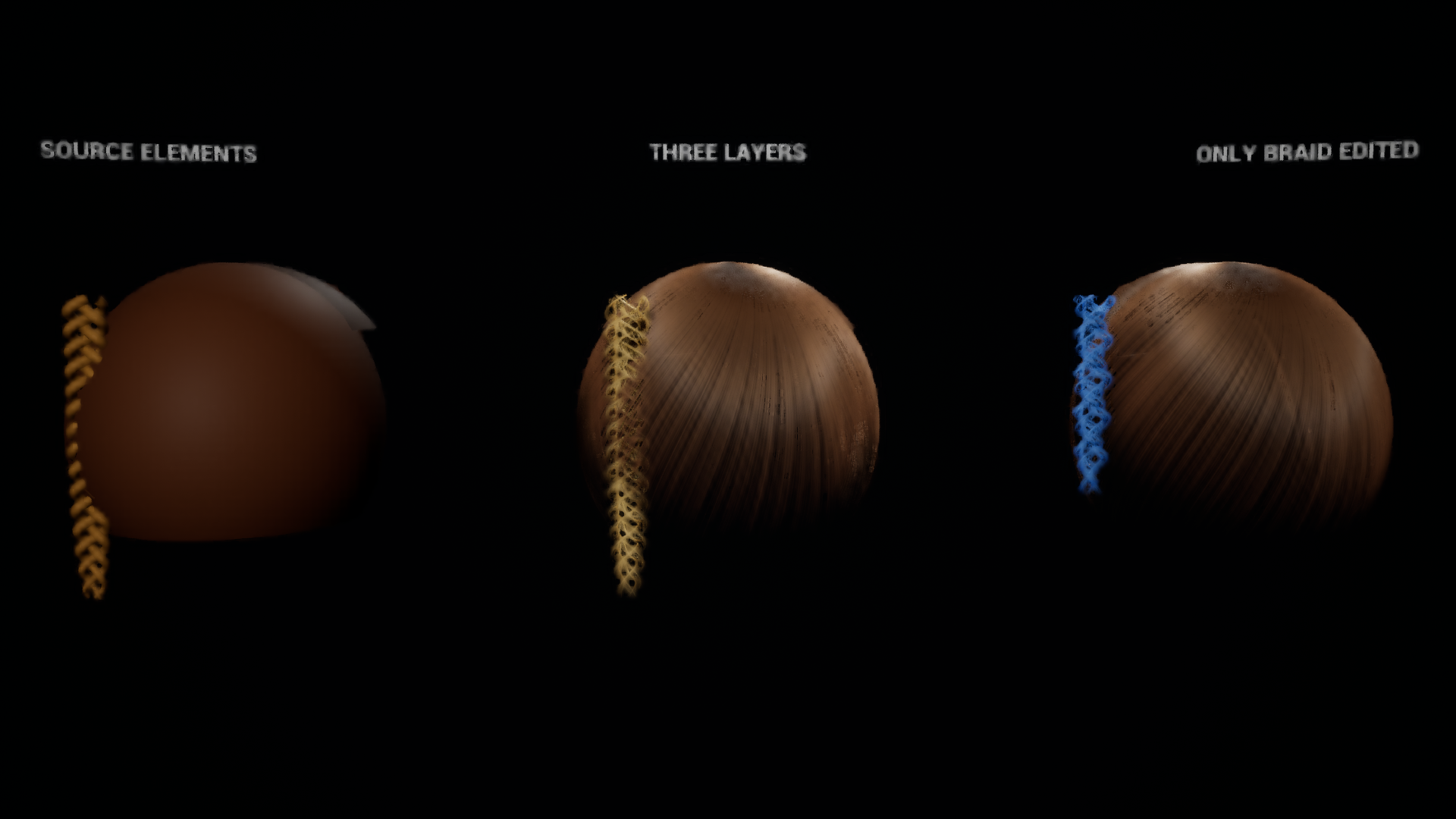
Keep a braid on its own layer
- Create a base layer for the crown and a separate layer for the fringe if it needs different styling.
- Add a layer named Braid. Replace its copied Hair Elements with the braid mesh; leaving the copied crown assigned would convert that crown again.
- Place the braid using its Hair Element transform. Select the Braid layer whenever changing its conversion, colour, widths, physics, or brush strokes.
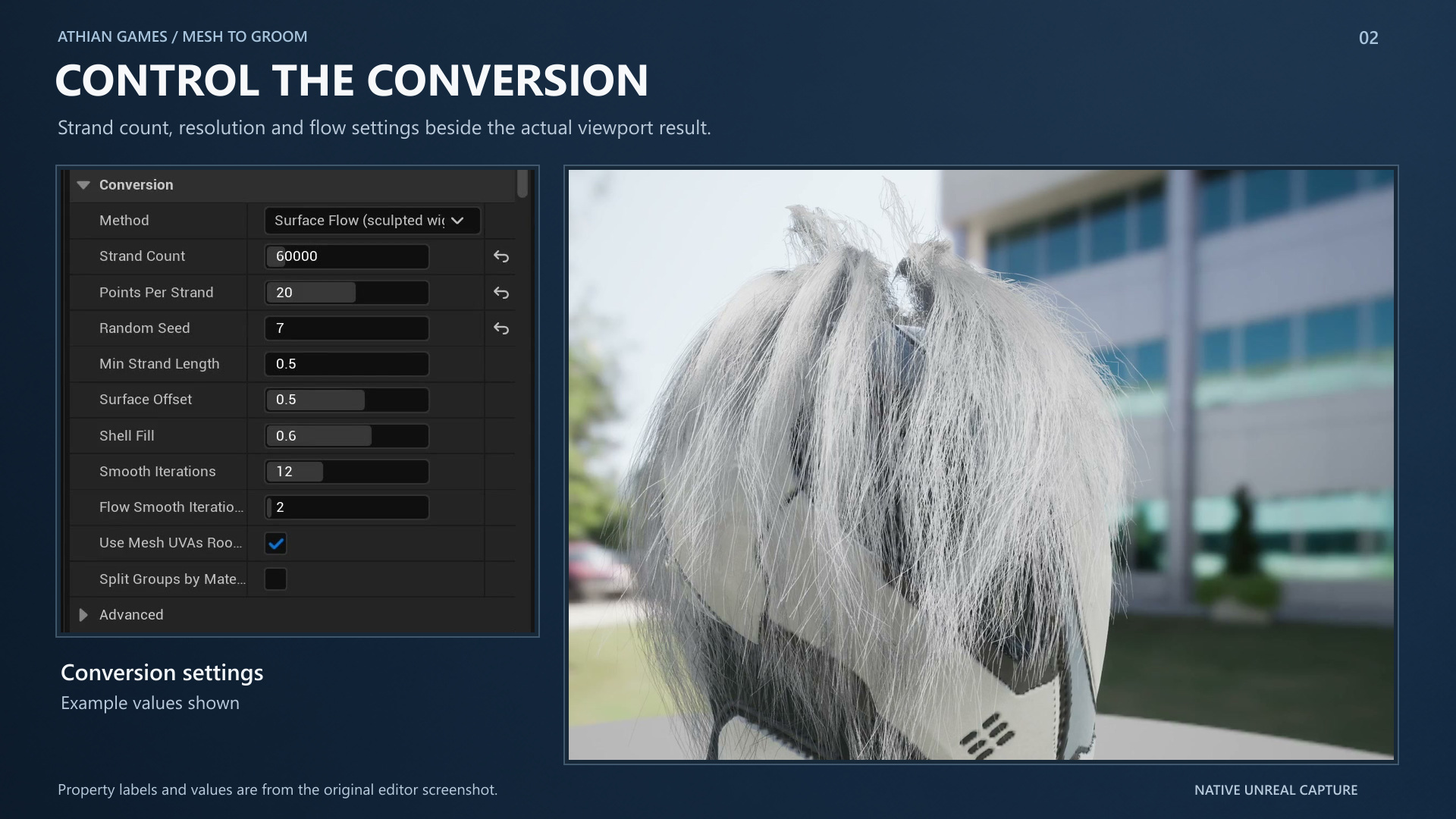
- Start with Surface Flow, Length Scale 1, and low Frizz, Curl Radius, and Clumping to inspect how well extraction follows the source weave.
- Raise Points Per Strand toward 64 for tight turns. Inspect the source and converted braid from the front and side. Flow Guides can steer ambiguous sections.
- Change one braid setting at a time. Hide the braid to inspect the base hair; switch Enabled off when the saved groom should omit it.
| Braid parameter | Effect on this layer | What to inspect |
|---|---|---|
| Strand Count | Changes the braid's sampling budget when Use Strand Density is off. | Coverage around the crossings; the crown has its own budget. |
| Points Per Strand | Adds curve samples along each traced strand, up to 64. | Sharp turns and folded sections; increase the preview point budget when comparing. |
| Length Scale | Shortens or extends strands from their roots. | Shortening can uncover the lower braid even though the source mesh stays in place. |
| Frizz / Curl Radius / Clumping | Styles the extracted strands on the braid layer. | Large values can obscure the original weave. These controls do not create a braid from straight hair. |
| Root Width / Tip Width | Changes rendered fibre thickness and taper. | Opacity and chunky crossings without changing the other layers' widths. |
| Colour Source / Constant Colour | Samples or colours this layer's strands. | Use a temporary contrasting colour to check layer separation. |
| Simulation | Assigns physics settings to this layer's groups. | Group settings are independent; simulation does not enforce interlocking braid topology. |
A separate layer keeps editing independent. The source must already contain the braid geometry. Conversion estimates strand paths on that geometry and does not guarantee an exact over-under reconstruction.
| Parameter | Default / type | Effect | When to use |
|---|---|---|---|
| Strand Count | 150000 / integer, 16–2000000 | Target number of Surface Flow strands. | Raise after inspecting density and the Report; final count can be lower. |
| Use Strand Density / Strand Density | Off / 250 per cm² | Derives the budget from source area instead of Strand Count. | Keep similar density across differently sized meshes. |
| Points Per Strand | 22 / integer, 2–64 | Controls curve detail along traced paths. | Raise for tight curls and folded locks. |
| Random Seed | 1337 / integer | Changes repeatable sampling and variation. | Try a new distribution without changing the other settings. |
| Min Strand Length | 0.5 cm / float | Rejects shorter traced strands. | Lower when the Report shows too many short strands discarded. |
| Lift Off Surface | 0.5 cm / float | Offsets strands from the source surface. | Fix strands buried in the source mesh. |
| Fill Volume / Root Guard | 0.15 / 0.2, fractions | Places some strands below the outer shell while keeping roots near it. | Give thick sculpted locks interior depth. |
| Auto Fit To Body Surface / Collision Clearance | On / 0.35 cm | Pushes strands away from the target body. | Reduce visible body penetration. |
Hair elements
Every enabled element on a layer is welded into one source mesh before tracing, so they do not become separate grooms. The strand budget is shared over combined surface area. An element with Enabled off stays in the viewport but out of the conversion.
A piece modelled as its own object (ponytail, braid, bun) does not touch the cap. Root Detached Shells (on by default) gives every unrooted connected shell a scalp of its own at the end nearest the head.
Roots
| Setting | Current behavior |
|---|---|
| Proximity To Target Mesh | Default. A hair vertex is a root when it sits within Root Proximity Distance of the target head surface. |
| Top Slice Along Axis | Fallback. The top Root Height Fraction of the bounds along Growth Axis is the scalp. Used automatically if proximity finds nothing. |
| Roots Penetrate Band | Spreads roots over the band's area instead of parking them on the outer rim. Without this, the crown reads as a ring around a bald disc. |
| Cull Hidden Surfaces | Rejects inner-shell vertices so half the strand budget does not go to hidden hair. Leave it on. |
| Follow Surface Grain | Steers flow and root fallback paths along sculpted locks, braids, and tubes. Default 0.6; zero keeps ordinary geodesic routing. |
Preserving sculpted detail
Surface Flow reads the least-bending direction of the source geometry, including concave grooves. Ambiguous crossings receive less directional influence. Root fallback paths also favour travel along the grain, helping them follow folded locks rather than cutting directly across them.
Tracing crosses connected triangle edges continuously, keeping strands apart as they pass over folds. Crown samples can travel through the root band instead of stopping as stubs. Flow smoothing reduces blending between different lock directions. Curve smoothing limits movement from the traced path and returns it to the source surface.
Surface Flow > Flow Guides accepts optional root-to-tip point arrays for a braid, coil, or individual lock. Place points on the source in groom space, in centimetres after the Hair Element transforms. Set Influence Radius to the lock width. Each guide claims its own region by distance along the mesh edges, so a disconnected nearby lock does not inherit its direction. Editing a guide rebuilds the flow.
Flow Guides steer extraction. Simulation guides remain controlled separately by Groom Build. A guide cannot recover hidden connections that the source mesh does not contain.
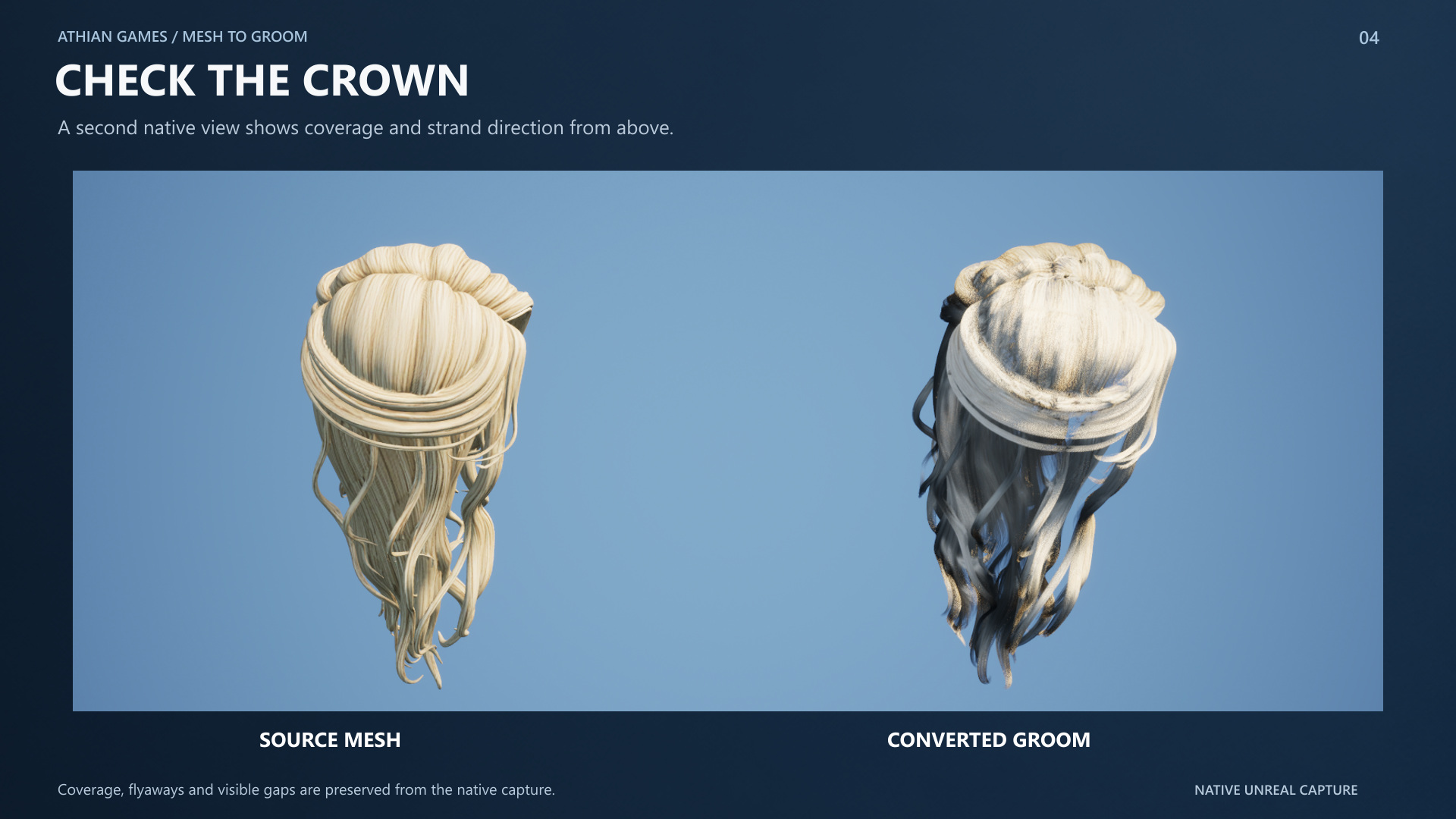
Volume > Fill Volume controls the maximum underlayer depth as a fraction of measured source thickness. The initial pass retains about 35% of its strands on the outer surface and distributes the rest through that depth. Gap-repair strands stay on the surface they were assigned to cover. Zero disables fill; 0.15 is shallow, while 0.5-0.7 reaches farther beneath thick locks. The total strand budget stays the same. Root Guard keeps the roots seated, and open patches without measured thickness are not filled. Compare the groom from below to check that it has hair beneath its outer surface.
Coverage checks intersect surface-normal rays with strand segments at fibre width. Tracing uses the maximum configured width; the final report includes taper and width variation. Sharing a coarse grid cell with a nearby strand does not count as coverage. This is a sampled geometric check, so inspect the crown and underside to judge rendered opacity.
Surface Flow concentrates its Points Per Strand budget where a straight segment would miss the traced curve, while keeping the original endpoints. Raise the budget for tight turns and compare the saved groom with the source from the side, back, and above. A reduced preview point budget can hide detail present at the final conversion budget. Keep Flow Smooth Iterations low when preserving small directional features.
The report
The Report panel shows source counts, roots, generated strands, discarded strands, density, geodesic distance, and grain alignment. Use it to diagnose:
- Root Vertex Count == 0 - transform or root settings are wrong.
- Hair Shell Count vs Rooted Shell Count disagreeing - a piece is about to come out bald.
- Strands Per Square Cm below ~120 - the sculpt will show through; raise Strand Count, not Root Width.
- Large Discarded Strand Count - Min Strand Length is too high, or the mesh is fragmented.
- Low Grain Alignment - flow directions do not closely follow the estimated locks. Check Follow Surface Grain and Flow Smooth Iterations, then inspect the shape; alignment alone does not verify a braid or bun.